 TransposeAny
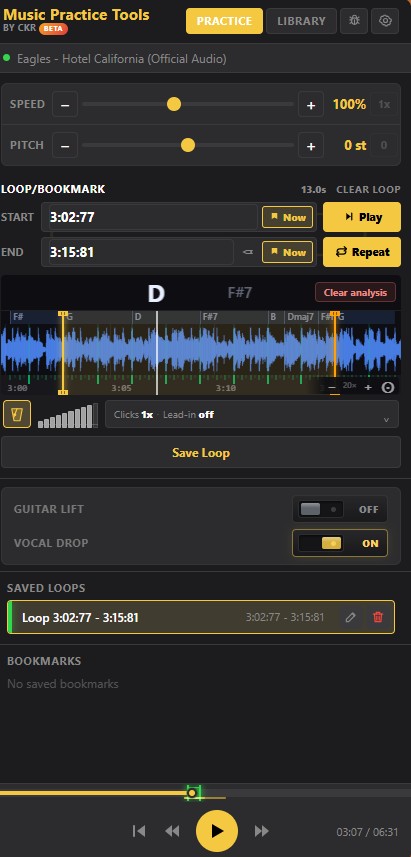
Transpose a Spotify track, step by step
- Use the web player, not the appClose the Spotify desktop app if it is open and go to open.spotify.com in desktop Chrome (Microsoft Edge works too). Log in as usual and start the song. An extension can only work inside a browser tab, which is why this matters.
- Open the TransposeAny panelWith the song playing, click TransposeAny in Chrome’s Extensions menu. The side panel opens next to the Spotify tab with Speed at 100% and Pitch at 0 st.
- Loop the hardest line firstDo not judge the key on the verse. Find the line with the highest note (for most songs, the last chorus) and paint an A-B loop over it on the panel’s timeline. The loop edges land on the beat, so it repeats without a stumble.
- Step the pitch one semitone at a timePress minus once, sing the looped line, and listen to yourself. Keep going until the top note feels free, not just reachable. Then loop the lowest line and check it still speaks.
- Turn on formant correction if voices sound oddAfter three or four semitones the singer can start to sound thick or cartoonish. The optional formant correction keeps a transposed voice sounding more natural, which makes it easier to copy phrasing.
Prefer to watch? TransposeAny on YouTube and Spotify on the TransposeAny YouTube channel shows the same panel beside a song.
How many semitones should you move?
Most people go too far. A song that strains you on one note usually needs one or two semitones, not five. Check where the melody spends most of its time, not just its single highest note: a chorus that sits on high notes for eight bars is harder than one that touches a high note once.
A quick rule for big moves: if you would need more than five semitones down, go up instead. Raise the track by 12 minus that number and sing the melody an octave below the recording. Six down becomes six up; seven down becomes five up. You end up in the same key, and the track never moves more than six semitones. Moving a recording a long way always colours the sound. The smallest shift that fixes the problem keeps the track pleasant to practise with.
Example: an E major song for a lower voice
Say a song is in E major with the chorus built on E – B – C♯m – A, and its high moment is a held B4. A baritone whose easy top is around G4 would lower it four semitones (−4 st). The key becomes C major and the progression reads C – G – Am – F.

Now check the other end. If the verse drops to B2, it now falls to G2, which may rumble for some voices. In that case try −3 st (D♭ major) and compare the two by looping each section. Guitarists get a bonus here: because the chord display moves with the transpose, the panel names the chords to play in the new key.
Pianists can use the same trick the other way. A ballad in D♭ played at −1 st sits in C, so you can learn it on mostly white keys and move it back up later.
When it does not work
- The panel does nothing. The song is probably playing in the Spotify desktop app or on another device through Spotify Connect. Play it in the Chrome tab instead.
- It still feels too high. Look again at the loudest, longest notes, not the quick passing ones. Those set the key.
- The new key sounds muddy. Pull the shift back by one semitone and switch on formant correction.
- You want it slower as well. Lower Speed separately. The key you chose will not move.
Common questions
Can I change the key in the Spotify desktop or mobile app?
No. TransposeAny is a browser extension, so it only reaches Spotify when you play the song in the Spotify web player inside Chrome (or Edge) on a computer. The installed Spotify desktop app and the mobile app are separate programs it cannot touch.
Will the song speed up or slow down when I change the key?
No. Pitch and Speed are separate controls. Moving Pitch leaves the tempo where it was, and you can slow the track down on its own (from 25% to 200%) without the key moving.
How far can I move the key?
Up to 12 semitones down or up, which is one octave each way. Most singers only need one to four semitones.
Is the Spotify audio uploaded anywhere?
No. The pitch change and the chord analysis run on your own computer. The extension is free and needs no account.
Keep practising
Sing it in your key tonight.
Pick one Spotify song that sits just out of reach, open it in the web player, and move it a semitone at a time until it fits.
Get TransposeAny for ChromeRequires desktop Chrome or Edge. This extension is not affiliated with Spotify.