 TransposeAny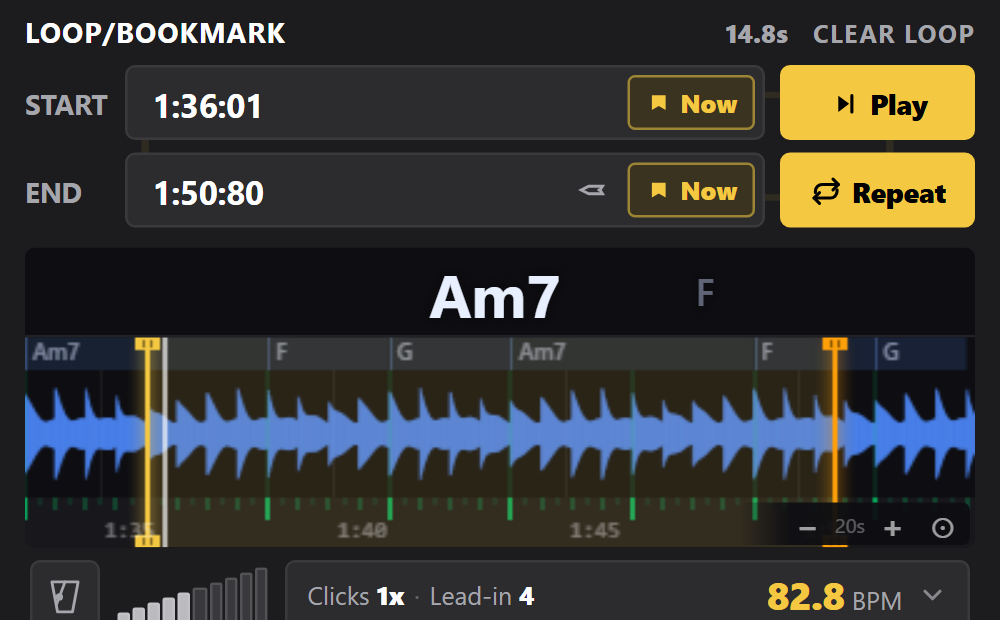
Slow down & loop: step by step
- Open the lesson and side panelInstall TransposeAny in desktop Chrome. Start your YouTube video, then open TransposeAny from Chrome’s Extensions menu. Choose a short phrase you can identify by ear.
- Lower Speed, keep Pitch unchangedSet Speed to a comfortable value such as 75%. Leave Pitch at 0 st to keep the recording in its original key. Listen to the passage before trying to play along.
- Set the loop boundariesAt the start of the phrase, use the capture control beside Start (“Set Start to the current time”). At the end, use the matching control beside End. Turn on Repeat and listen to the transition back to the start. Adjust the markers if the loop cuts off a note.
- Build back toward full speedWhen you can play several clean repetitions, raise Speed a little. If accuracy slips, step back. Return to 100% to check the phrase against the recording’s original pace.
Example: practise a 120 BPM passage at 75%
Playing at 75% turns a passage recorded at 120 BPM into roughly 90 BPM. The pitches stay the same, so you can play your instrument normally without retuning to match slowed audio.
Try 75%, then 85%, then 100% as practice milestones—not a timer. Move on when the rhythm and articulation are reliable, rather than after a fixed number of repeats.
Make the loop small enough to learn
Start with one or two bars, including a little musical context before the difficult note. Once that works, widen the loop so you practise entering and leaving the phrase. Save a useful loop in the panel if you want to return to it later. Slower playback can change the texture of the sound, particularly at extreme settings.
See the practice panel in action
This 30-second product overview shows how loops, speed and pitch fit into a practice session. Follow the steps above for this guide’s specific exercise.
Common questions
Why use this when YouTube already has playback speed?
YouTube’s speed control is useful for a quick slowdown. TransposeAny brings speed, independent pitch adjustment, loop boundaries and saved practice sections together in one side panel.
What does 100% mean?
100% is the original playback speed. 75% is three quarters of that speed, and 50% is half speed.
Will slowing down change the song’s key?
Speed control preserves pitch. Keep the separate Pitch control at 0 st if you want the original key.
Can I save the slowed audio?
These steps are for practising during playback. They do not create or download a slower audio file.
Keep practising
Try it with a song you know.
Open this guide on your computer, install the free extension, and start with one short passage.
Get TransposeAny for ChromeRequires desktop Chrome. This extension is not affiliated with YouTube or Google.