 TransposeAny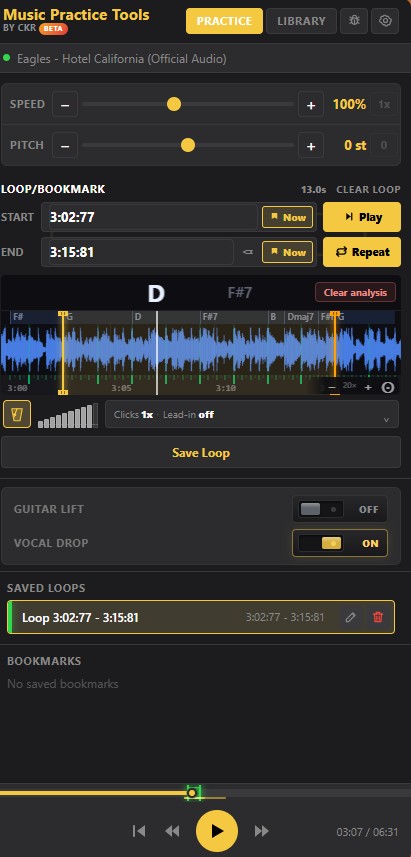
Change the key: step by step
- Open your song in desktop ChromeInstall TransposeAny from the Chrome Web Store, open a YouTube video, and start playback. Open the extension from Chrome’s Extensions menu to bring up its side panel.
- Find a short phrase to compareChoose a phrase that includes the highest or lowest notes you need to sing. Listen once at the original pitch so you have a reference. Leave Speed at 100% while finding your key.
- Move Pitch by semitonesUse the Pitch control to go down or up. A negative value lowers the song; a positive value raises it. Try −1 or −2 first, replay the same phrase, and adjust until the range feels comfortable.
- Practise in your chosen keyRepeat the passage at the new pitch. You can also slow it down independently. Set Pitch back to 0 st to hear the original recording again.
Example: move a song from C to A
If you know the recording is in C major, lowering Pitch by three semitones (−3 st) moves it to A major: C → B → B♭ → A. The timing stays the same. The whole recording shifts, including the singer and instruments.
The Pitch number is a relative shift, not a key detector. If you do not know the original key, compare a familiar phrase by ear rather than assuming that 0 st means C.
Find a comfortable key before learning the whole song
Check both the highest and lowest phrase. A lower chorus may feel easier, but the verse can become too low. Once you find a workable setting, loop the difficult passage and practise it consistently. Large pitch shifts can change the character of a voice or instrument; use the smallest shift that solves your problem.
See the practice panel in action
This 30-second product overview shows how loops, speed and pitch fit into a practice session. Follow the steps above for this guide’s specific exercise.
Common questions
Does changing the key also slow the video down?
Pitch and Speed are independent in TransposeAny. Leave Speed at 100% to transpose at the original tempo.
How far can I transpose?
The pitch control supports up to 12 semitones in either direction: one octave down or up.
Does this rewrite sheet music or export an audio file?
This guide changes what you hear during browser playback. It does not rewrite notation or create a downloadable transposed recording.
Can I use this in the YouTube mobile app?
These steps require the extension in desktop Chrome. They do not add controls to the YouTube mobile app.
Keep practising
Try it with a song you know.
Open this guide on your computer, install the free extension, and start with one short passage.
Get TransposeAny for ChromeRequires desktop Chrome. This extension is not affiliated with YouTube or Google.